
The Connecting Collective is now an app! Here’s how to download:
For IOS/ Apple:
-
- Find the share icon at the bottom of the screen and tap.
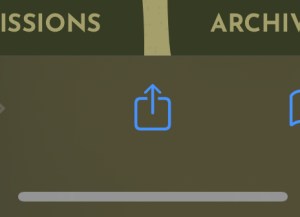
Apple share icon - Scroll until you see “Add to Home Screen”

Step 2 - Tap Add!
- Once it’s uploaded, tap the red bell in the right corner for notifications. These are important to stay updated on dropbox, opt into daily affirmations, questions, and more!

Step 4 For Android:
1. Find the menu button, which is the 3 vertical dots. It’s typically in the top right corner( at the very bottom of the menu in this photo).
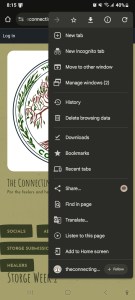
I know it’s blurry 🙁
- Find the share icon at the bottom of the screen and tap.
2. Tap add to home screen.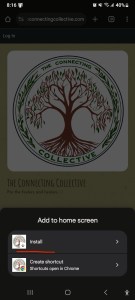
3. Click install!
4. Once it’s uploaded, tap the red bell in the right corner for notifications. These are important to stay updated on dropbox, opt into daily affirmations, questions, and more!
